For advocates in India
Case management for Indian advocates, free for 3 months
AdvocateFlow is a practice-management web app for Indian advocates and small chambers: court diary, matters, process and certified-copy tracking, e-filing paper books, drafting, research and GST invoices in one place. Its AI runs on Surge Software's own server, so client files never go to an outside AI company. The first 3 months are free with every feature on; after that you pay only for what you use, at our cost.
No card needed. After 3 months, pay only for what you use.
Read the transcript
Your diary is in a notebook, next dates are on WhatsApp, and certified copies live in the clerk's head. One missed date can cost a client the case. AdvocateFlow puts the whole practice in one place. Each morning, the Today board shows what is listed, which hearings still need a next date, and every task that is due. Open a matter to see its hearings, parties, service, certified copies and documents on 1 page. After a hearing, type one line and the next date is saved. The process tracker follows service on every party, process fees, orders awaited, certified copies and registry defects, so nothing is left to memory. The limitation calculator applies the Limitation Act, leaves out certified copy time and moves past court holidays, showing every step. Raise GST invoices for your fees, with reverse charge for business clients, and see what each client still owes. Everything is unlocked from the day you sign up. Usage is shown at ₹0, so you can see what it would cost later. Free for your first 3 months. Then you pay only for what you use. Start free at AdvocateFlow.
Who it's for
Solo advocates
You want to know every morning what is listed, which hearing still needs a next date, and which deadline is close. No more diary in the bag.
Small chambers
Your juniors and clerks share one diary. You assign counter and desk work, and the audit log shows who did what.
Section 138 practices
A bank sends a hundred cheque cases at once. Import them from a spreadsheet and every notice, payment and complaint deadline is tracked.
How it works
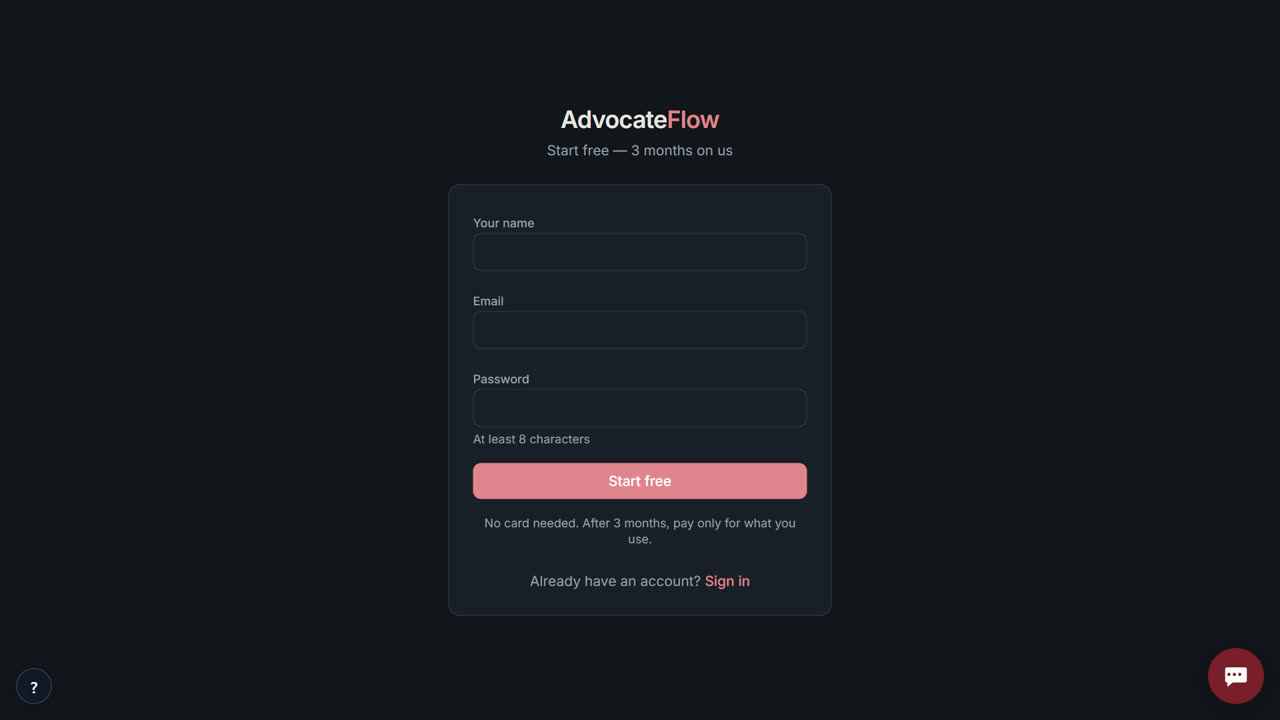 Step 1
Create your free account
Your name, email and a password. Then give your chamber a name. It takes under a minute and no card is needed.
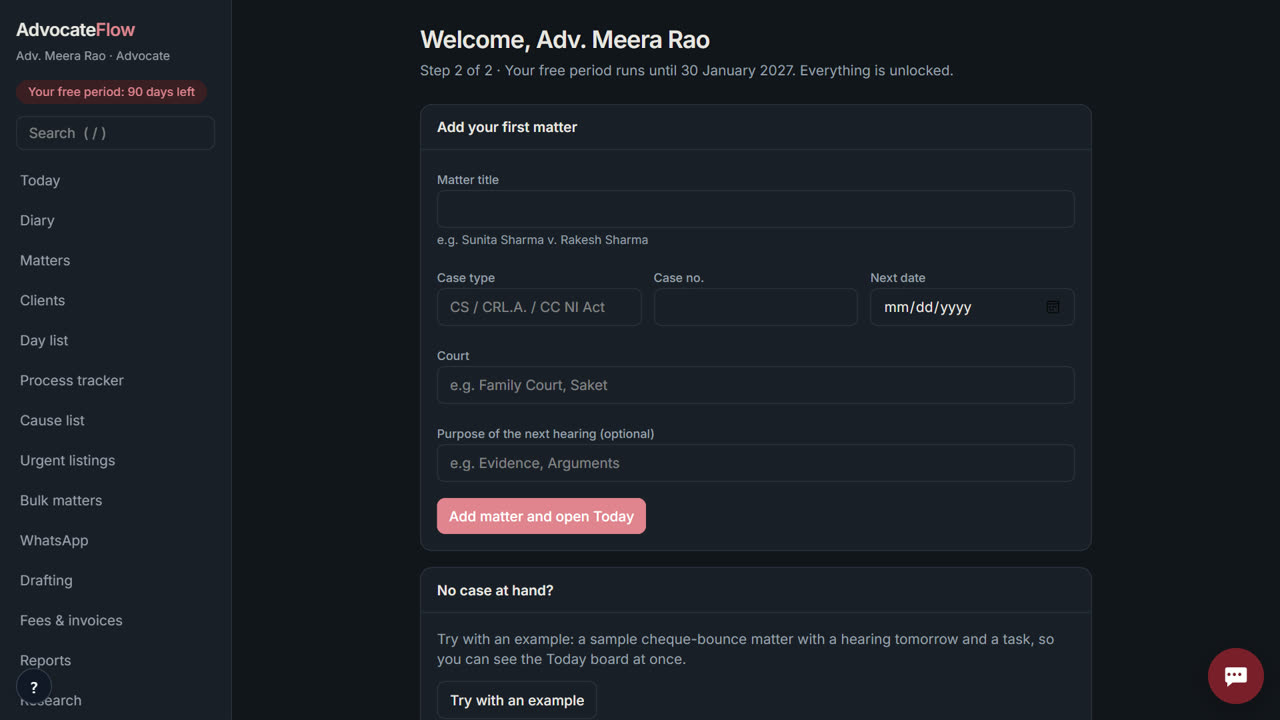 Step 2
Add your first matter
Type the title, the court and the next date. No case at hand? Press “Try with an example” to get a sample matter with a hearing tomorrow.
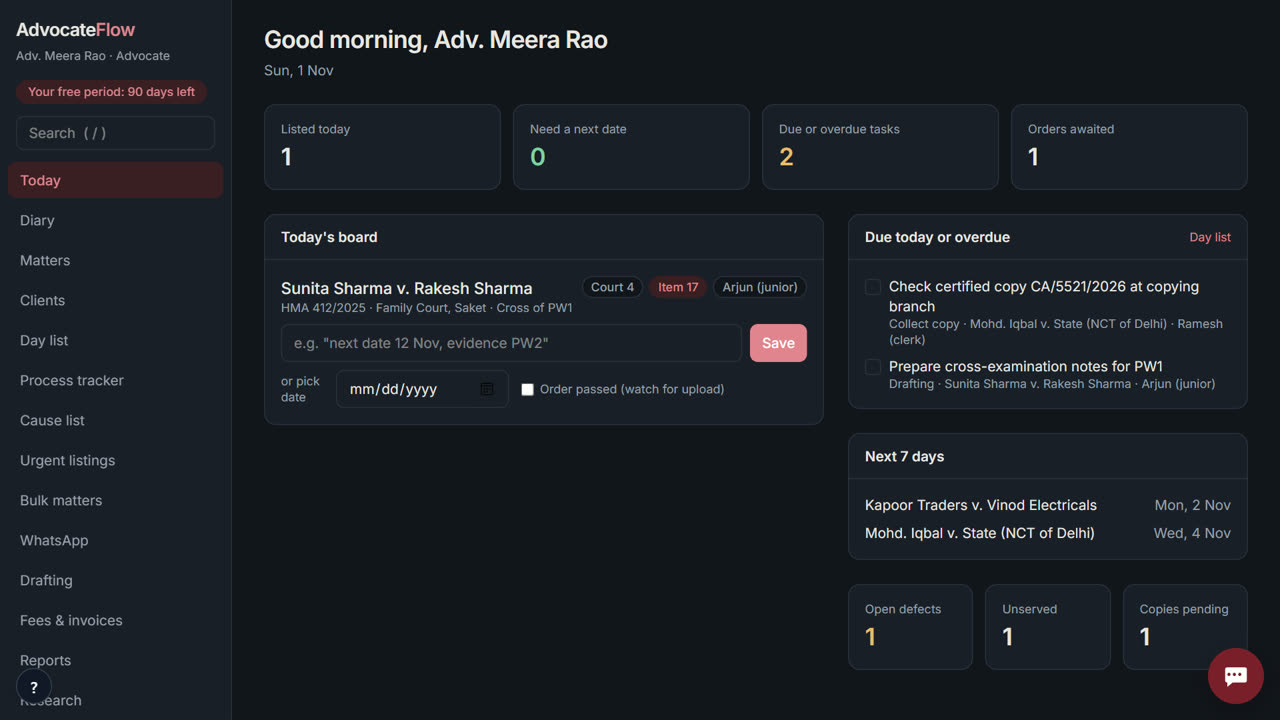 Step 3
Open Today every morning
The Today board lists every hearing, the dates you still need to fill in, and tasks due. After each hearing, type one line with the outcome and next date.
What you get
Today board and diary
Listings, missing next dates and tasks due on one screen, with a week view for the whole chamber.
Process tracker
Service on every party, process fees, orders awaited, certified copies and registry defects, each with a due date.
eCourts status by paste
Paste the eCourts case-status page and the CNR, stage, next date and history are read in. Paste a cause list to find your item numbers.
Limitation calculator
Applies the Limitation Act with certified-copy time (section 12(2)) and court holidays (section 4), and shows every step.
E-filing paper book
Index, continuous page numbers, bookmarks and volume split to the court's size limit, with a pre-filing defect check.
Section 138 bulk mode
Import cheque cases from a spreadsheet, track every deadline, and draft notices and synopses in bulk.
GST invoices and fee ledger
Reverse charge for business clients, exempt for individuals, amount in words, dues per client.
Private AI on the case file beta
A one-page case brief, questions answered from the file with the passage cited, and OCR of scans and phone photos.
See every feature · Free tools, no sign-up · Guides for advocates
Free for your first 3 months. Then pay only for what you use, at our cost — no markup. Monthly plans coming soon.
See exactly what things costCompared with Provakil
| AdvocateFlow | Provakil | |
|---|---|---|
| Price | Free for 3 months, then at cost | Paid plans (check their site) |
| Service, process-fee and certified-copy tracking | Yes, with limitation linked to copy dates | Not listed in October 2026 |
| E-filing paper book and defect check | Yes | Not listed in October 2026 |
| Urgent listing desk and section 138 bulk mode | Yes | Not listed in October 2026 |
| Automatic eCourts tracking | No — status comes in by paste (no CAPTCHA bypass) | Offers automatic case tracking (check their plan) |
| Where the AI runs | Surge Software's own server | Check their site |
Questions advocates ask
Is it really free?
Yes, for your first 3 months (90 days from sign-up), with every feature unlocked and no cap, including SMS briefs and WhatsApp messages. No card is needed to start.
What happens after 3 months?
You pay only for what you use, at our cost with no markup, from a prepaid wallet: ₹0.13 per AI answer, ₹0.02 per scanned page, ₹0.25 per SMS brief and ₹0.14 per WhatsApp API message (estimates). The diary, matters, invoices and email briefs stay free. We email you on day 75, 85 and 90.
Do I need a card?
No. You sign up with your name, email and a password. You add money to the wallet only if you want the paid actions after your free period.
Is my data safe?
Each chamber's records are separate, every member signs in with their own role, and every change is in the audit log. AI runs on Surge Software's own server; nothing is sent to an outside AI company. You can export all your records any time.
Who is behind AdvocateFlow?
Surge Software Solutions Private Limited, Bengaluru. The founder is Venu Gopal Reddy Muvva. Write to [email protected].
Can I talk to a person?
Yes. Ask the assistant on this site; if it can't answer, leave your email and the founder replies, usually within 10 hours. Or write to [email protected].
Does it work with eCourts?
Yes, by paste. Copy the eCourts case-status page into a matter and AdvocateFlow reads the CNR, stage, court, next date and history. It does not bypass the eCourts CAPTCHA, so it cannot track courts automatically.
Can juniors and clerks use it?
Yes. The advocate, juniors and clerks each sign in with their own role; clerks see counter work, juniors see their matters.
Does it work in court without internet?
Install it on your phone from the browser. The next two weeks of the diary stay available offline, and outcomes you enter offline sync when you are back online.
Is there a judgment database?
No. Research works over judgments you import from Indian Kanoon links or PDFs, with answers cited paragraph by paragraph. For a licensed database, use SCC Online or Manupatra alongside.
Run your chamber from one screen
Start free — 3 months on usQuestions? Ask our assistant (bottom right) — it answers 24/7.